Showing posts with label beta. Show all posts

Wednesday, 9 July 2008

It's In The Stars

To be honest, I've never seen the fascination with stars...  The reading of, the studying of, the watching, the celebrity-variety.  And if I am REALLY honest, I don't get why stars are given as awards.  WHY is something good worth five stars?

"Well done, that's such a good bit of work, I will award it five balls of burning gasses from the depths of space"

Doesn't have the same ring to it, does it?

It can't be all about the shape, as there are lots of pokey shapes to be had - WHY does it have to be the five-pointed variety?  Why not six?  Or twelve.  Not two though - two would just be... erm.. a stick.

However, being that I am still playing around with Blogger In Draft - which I suppose is Bloggers new Beta.  Have to play with the betas.  It makes me cool.  Anyway, you will now see - hopefully - at the bottom of each post is a little star-rating thingiemajigg for you to "rate" the post it's attached to.

I know a lot of people read my posts, but a lot of you are cowards that don't like to comment.  Some of you go as far as using the Tagboard off to the side there, but there could be MORE interation.  So, if you don't want to comment, if you don't want to use the Tagboard, then click the stars.

Except you dirty RSS Readers ;)  You can come over here and load the page in order to use it.

Now, I am hoping that over time, Blogger will add a widget to show the "Highest Rated" posts and suchlike in a sidebox... I would assume that would be the next logical step, but still.

Feel free to be harsh - like you are anyway - and if you think a post sucks the floppy one, rate it.  I'll ignore the rubbish ratings anyway ;)  My Blog, after all.

If you're using Blogger In Draft, then there's a post on their official blog about Star Ratings.  However, because some people are idiots that mess around with their templates all the time, it doesn't always work properly, in which case, I found a very handy guide to getting it to work on another blog called At The Edge.  So thank you to the author there :)

Wednesday, 2 July 2008

Template Woes

Slowly, slowly but surely, I am trying to get a decent template on here. Well, I say "surely" but what I mean is, "I find something rather nice, then either have to tweak it, alter it or just outright bin it"

Today is no different. I have been sat here for a couple of hours today trying to get a template to look just so but do you think I can get there? Can I f'k.

My first issue is that I fell asleep not long after I started on it. However, unlike those that feel tired and have a little lay down, I was forcing myself onwards.. And woke up an hour later in my computer chair, face down on my desk. I completely forgot what I had been doing, so I deleted and started over. Now for the last hour and a half, I've been altering and fiddling and what-have-you, trying to get a (Spanish!) template to look right.

However, I've learned from a million a couple of times when I broke 0ddness to do it elsewhere - so have been using my random blog for just such purposes.

My biggest issue, is I couldn't say exactly WHAT I want. Three columns. Clear, Clean, Professional... Dark-ish but not dreary colours. Then there is the OCD-Anally Retentive part of me that has to have things just so. Trying to balance two side columns to look neat. Everything in line. Colours that match - or near as dammit.

And for the love of all things banner-like, can I PLEASE find a template that isn't steered towards AdSense, Banner Ads, Tower ads and all the rest of that shit. And please please, a header image that I can change...

Currently, I have the following layed out on my stomping ground blog: Clicky to Lookie. There is so much WRONG with it, but the basics are quite nice. Maybe a bit cluttered - which I need to figure a way to cut down. The header image is actually two different, different-sized images which is a f'ker. And mostly, more importantly, I want it to load fairly quickly - not struggle through reams of code, background images, sidebar images and everything else... Some blogs I visit have a massive load-time thanks to the template itself, not the stuff on there. Content loading, no a problem, but if the template is slow then I get bored.

I don't know - I doubt I will use it in the long run as I don't look at it and think "Wow, that's nice" I look at it and think "Maybe it'll do for now". The current theme on 0ddness is probably my longest-serving theme since switching to the new version of Blogger, and it's not what I would call a nice template, more a "it'll do" template.

I've sifted through a load of different template sites on Google - the various search strings of "Blogger Templates" "Blogger XML Template" and so on and so on... Somewhere out there, there MUST be something that will satisfy my whiny-crotchety-anally-retentive self... There MUST be...

If anyone has any suggestions, please let me know - but if it's plastered with ads, either random ones or a banner for the author, no thanks ;)

*resumes thumping head on table*

And you know what - I dislike that template on my spare blog more and more, the more I look at it.

Monday, 9 June 2008

Mine's Prettier Than Yours

For a while now I've been playing around with Blogger In Draft - that is, technically, the Beta Version of all the fangled new stuff they are working on. I've mentioned it before, and have been playing with some of their stuff before people not on Draft get to play with it.

Nothing is secret (at least, I hope not. Please don't tell me off!) on there, and anyone can access it through the afore-mentioned link (here, in case you're dim) and I've used some of the new stuff - the New Post list I had for a while was part of that (which is now available to all), and the future posting I use every now and then is rather handy, again, available to all.

Yesterday I thought I had broken something when I logged in. Usually, when I get to the dashboard, I see what you see:


Not really a lot I can comment on it really - it's nothing new. However, yesterday...


It's all very shiny and professional looking. Not sure why I like it more, I just do.

Who knows, maybe you peons will get yours updated in the coming days ;)

In other news... People that are getting sick to the teeth of Twitter being a complete pain in the rectum, Matt and Sam have found Plurk. It's similar to twitter, except it seems to work (oooh meow!) and has a purdy interface thingie that shows the posts on a timeline - and you can reply to them, unlike Twitter where things got... well, kinda knotted and tangled.

I'm still getting to grips with it, and it does have a few things that I would like to see done differently, but I've already put my two pence in to see what happens there. Still, go take a peek. You can see my Plurk page here

Tuesday, 14 November 2006

WYSIWYG Editor AWOL?

Here's an odd problem. Those of you that use Blogger will know the screen you enter posts in - well, all my buttons across the top have vanished. No font, size, bold, italic, colours, links... The ODD thing is, they are here in Internet Explorer, but not Firefox.

Even more odd - checking the Blogger Help Group - it seems some people have them in Firefox but not IE, none at all, or all fine.

Lucky for me, I know the HTML code for the bits I use regular-like, apart from uploading pictures.

Answers on a post-card.

PS: WYSIWYG is an acronym for "What You See Is What You Get" in that, you make something bold, that bit will be bold, and so on.

Monday, 6 November 2006

For Tim

Drop Down Labels. Thought it was simple, but couldn't remember. Checked the box, nothing, so checked the code, got confused. The realised I took the code from the web. Hunted. Found It!

I'm hoping it's simple enough to understand, if not, give me a shout, and I'll point and laugh see what I can do.

Monday, 25 September 2006

Errorness

So I had an evening playing World of Warcraft. All fun and games, and while those we play with take it seriously, it's not that serious. Fun with laughs, is probably the best way to describe it. Jo knows a few of them from her LARP games, and I just and piss-take (*gasp*) with a few, and chat to a couple of others.

One of said "others" Kirie - an American Ex-Pat living down in Brighton - has pointed out that at the eeeeend of the page, after the last post but before my sarky footer, is a link for "older posts". Turns out it's busted. Turns out *gasp* it's not me, but a known Blogger Beta error.

So, for those wanting to stalk read further back, there is the "Archive" link in the sidebar in a drop-down menu. I've checked it and it seems to work in both Firefox and Internet Explorer, so all well and good.

And while checking I notice that Joansy has asked a question in the box there - yes darlin, Labels are a Beta only thing. I've only added to the last week-and-a-bit of posts, but will add to every new post from now. You also get a little drop-down menu that shows all the labels you've used before, so you don't end up with "friend" and "friends" or whatever :)

Anyway, with my concentration now focused away from WoW, I'm back to feeling icky. Jo has had the dose of her meds altered this week, so she's all wiggly at the moment too.

And being ever so smart, I decided this evening to rip up a load of weeds from the back garden that have been bugging me. So I went from feeling rough to feeling rough and hurting like buggery. One day I'll engage brain cell. Maybe. Anyways, to prevent me keeping her ladyship awake (Her Ladyship, Senior, that is) all night by my tossing and turning, I'm on the sofa tonight. My decision.

In other news... Well, that'd be telling (no, Jo isn't preggers!) but I'm keeping schtum for now until it all goes through......... And "She-Who-Already-Knows" - shush ;)

Last but not least - to the two of you that mailed me today and asked for the link to my private blog. Heck no. With a capital Heck No! hehehe

Sunday, 24 September 2006

Starting And Finishing The Same Way

So, today started with 0ddness being broken and me fiddling around with settings and buttons and code and everything else, and now I think I've finally gotten it sorted, it's not far off my bed time,

See, despite feeling like absolute pants today, we went out for the day to our friend, Ruths. While I'm not coughing, sneezing and spluttering, I'm aching, my head is pounding, I have a temperature, and I generally feel crappy. We went and had Sunday lunch, were social, did the clearing up, had some laughs - was an all-round good day. The kids were busy little beavers, burning through a jumbo box of chalks on her entire path - bear in mind, her garden is pushing 150ft long...

We got in just after six this evening and I flopped down and found people really disliked the other template for the blog, so set to trying something else. Which was worse. So I tried something else which I didn't like, and have finally settled on what you see here. Well, for now. Amusing thing is, this is the template I used when I originally started blogging waaay back.

I managed to find a hack elsewhere to reduce my Labels section into a dropdown menu, so thanks to the chap over at Hackosphere for his help - I've actually mailed him and asked about doing the same thing for "Blogs I Read" and "Links", as well as making all the dropdowns the same width. This is another coding language that I am not confident playing with - simple edits here and there, but that's it.

So - I started the day fiddling with my... blog, and will finish it the same way at this rate. Or I'll watch a DVD. Either way ;)

To Sum Up...

For those just joining us on this wet Sunday...

0ddness got borked. 0ddness got bent over and Farmer Jed arrived with his pitchfork.

As best I can tell, the template I was using - a non-beta, non-blogger template - was hosted elsewhere. The mysterious place of Elsewhere seems to have upped, rolled over, and taken it's last breathe, leaving me with a very broken blog. No theme, no fonts, no colours, just text - here's a screenshot of what I woke up to. Not purdy.

So, I was left with a choice - either try and recode the entire thing (Which is on my list of things to do, along with walking on water and turning the bread into wine), or press the Plooey Button and start over.

And as you're reading this on ever-so-pale-blue theme, the Plooey Button is the route I took. Out of all the other blogger templates, this was the closest I could find to my previous. Of course, I've yet to figure out the new template editor completely, so links and blogs I read are now back to being oh-so-long lists.

The upside... Well, I'm not sure. I THINK this now means I can switch between the different templates and not have to fiddle-faddle with everything and redo links, chat boxes and every thing else, but I'll have to experiment. I've also added Labels to the blog template, so at the bottom of each post, I can add a label or three. This post, for example, will be filed under "Beta" and "Template". In the side box are all the current posts I've added labels to - click on a label marked, say, Beta, will show all the posts I've marked as Beta. And so on.

Rocket Science, it ain't.

So - unless I decide on a different Blogger Template against this one, this is how it's going to be. Until I can convert my previous to beta or whatever else. Don't be surprised if the look of this changes in the coming days...

Friday, 15 September 2006

Blogger Oopsie

Seems that Blogger is having a very bad morning, and after some careful checking, I've figured it out. Of the 30 blogs I read on a daily basis, the ones that have all gone offline are... Non-Beta Blogs.

Mine and Jo are fine (Beta), as are the two crazy Basildon Girlies Laney and Lara (also Beta). China Blue is fine as well (also Beta) with her interesting rant about scented tampons.

Everyone else that is non-beta... well, the instructions how to switch are below! hehehe

Edit: And it seems to be OK again. Well, except poor Joansy, her's is still fighting being online.

Switching To Beta

OK for those of you that have mailed/text asking for help converting to Beta, it's a very simple, painless process. Before you switch, you should bear in mind a couple of things. First, it's Beta, which means it's still in testing phase - it should be fine but there might be problems - like my profile image not working.

Also if you're not using one of the Blogger templates, then you wont be able to use all the features. My template came from elsewhere, so I can't use the template editor on this blog. I'm pretty sure most of you are using a standard template, so no worries there.

If you're using anything funky on your blog - like a Cbox for example - then you will have to re-add it with the new template editor - just make sure you've got your Cbox/TagBoard or whatever login details. Same goes for StatCounter code as well, and anything else you've added. You'll need to log in to the various sites to get the code again.

Lastly, you'll need to create a Google Account. Sure it's a bit of faffing around, but now Google own Blogger, it's going to be required at some point in the future anyway. If you've got a Gmail/GoogleMail account, that's fine too.

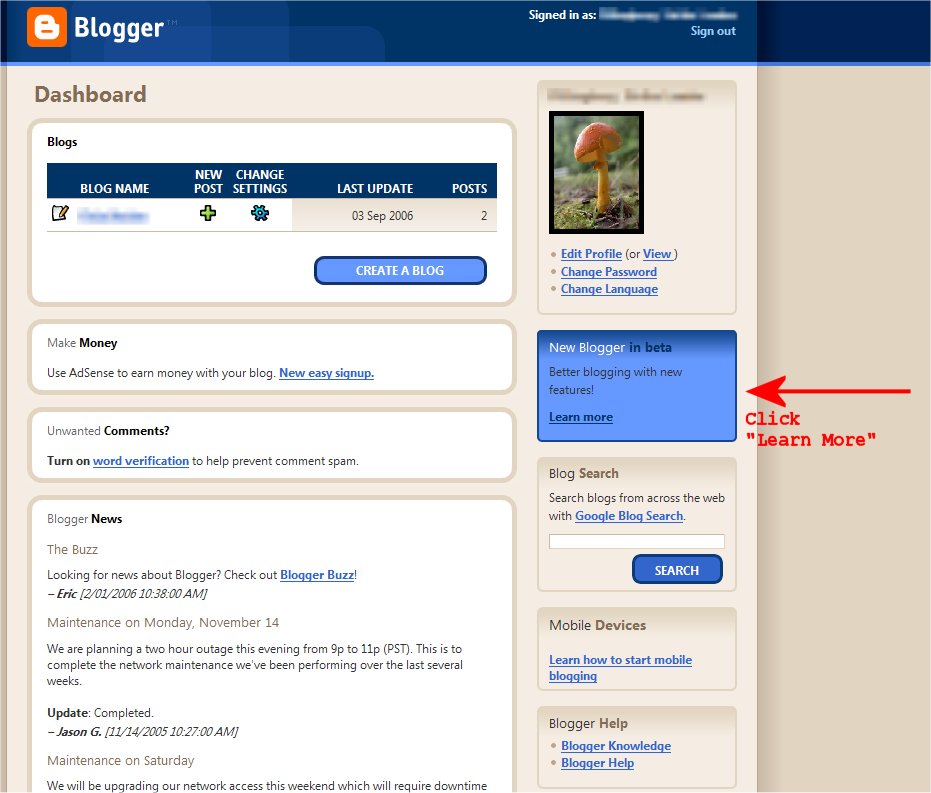
As for doing the switch, you need to log into your Blogger account as usual and go to your Dashboard, where you will see the following:


Under your profile you should see a Blue Box - click on Learn More, and this will start the process, and take you to the next page:


This gives you the basic-basics - read the info and if you're not happy, click "I don't want to" and that will end it. If you do, enter your password and put a tick (check mark) into the little box and click continue, taking you to the next page...


If you've got a Gmail/GoogleMail/GoogleAccount, then enter the details under the YES box, and after clicking "Switch to the new blogger" it will do it all for you. This blog took just over an hour to go through, while my other blogs were instant - it's size dependant. If you DON'T have any kind of Google Account, click no and follow the instructions that come up - again, very painless and easy.

If you want a Googlemail/Gmail account, let me know - one of my gmail accounts has a wad of invites left so I can send them out if you want them :)

And that's that - all nice and easy. Click on the pics to make them larger, and yes, I've taken out all my details - I have other blogs elsewhere, and this was the only way I could get the process screen-captured. And no, you can't have the link.

Besides, I've made them private now anyway - another handy dandy feature of switching to Beta ;)

The Power of Peer Pressure

So after the storm night before last, I tried all sorts of methods of restoring Jo's emails that she's been saving for... erk... seven years. I tried rebuilding the database, I tried renaming all the files and re-importing, I tried converting to a different format, I tried Netscape import, I tried Thunderbird import...

Nothing. Aside from half the inbox, I can't find any of her mails to save. Anywhere. She's all "Don't worry about it" while I am screwing over it. Figures.

Anyway, I've been using Firefox and Thunderbird for a long time now, but Jo has always been "Keep your odd software away from me!". For anyone that doesn't know, Firefox is a browser (akin to Internet Explorer) but with better features, and Thunderbird is an email client (akin to Outlook/Outlook Express), again, with better features. A weekly scan for nasties on out machines usually comes up with one or two for me, and a wad for her - but still she won't swap it.

Being the persuasive person that I am, I finally managed to convince her to swap. So she now has both running on her system.

But Wait - there's more!

After that, I was showing her the stuff in Blogger Beta, and convinced her it's sooo much better, and hey-presto, she swapped to that too! OK, my only reason for getting her to swap was so I can comment on her blog. Ulterior motives and all that ;)

And then last night I managed to convince our friend Ian that HE needed Firefox/Thunderbird as well.

Now to work on convincing Stuart to switch to Beta as well so I can continue to comment-spam him...

Edit: For anyone that doesn't know, Blogger Beta users can only comment on normal blogs if we select the "Other" option - which means you've got to set your blog to "Anyone can comment". If you've set your blog so that only registered users can post, then we can't comment. If you're worried about spammers, select Word Verification instead. There are a few of the blogs I read that I now can't post on, so come on people, let my spamming resume! I'm not naming names though, as a couple of these people don't want their blogs advertised.

Which leads me to another feature of Beta - you can set it so that only certain people can view your blog! Privacy! Secrecy! No one can stumble onto your secret hidden blogs any more! YAY!

Wednesday, 13 September 2006

Nice

After letting people around the world know about my new URL "0ddness with a Zero, not an O" the blog got hammered yesterday with just under 200 unique hits. Not bad. And the range of countries is pretty cool, covering each and every continent except Russia. We scored a few in Asia, Australasia, South and North Americans, Canada, lots of Europe, and two in Africa.

So if you're new here, welcome :) If you've been here for a while, thanks for coming back!

I've been toying with the idea of redesigning the blog layout - the new template editor in Blogger Beta seems quite nifty - I'd go as far as saying it's "Idiot Proof" but then, I've seen what someone can do to a blog template ... I've had a mess around, but have decided to stick with what I have, even though I am likely to change my mind at some point in the coming days, weeks and, well... minutes most likely ;)

I've also changed my "Blog" email address to my Gmail address - 0ddness.Bl0g AT googlemail.com - obviously you have to replace the " AT " with a "@". And it's 0ddness.Bl0g with zeros, not O's.

I was messing with the Neocounter visitor list and visitor map earlier, but held myself back from adding more stuff to the sidebar. One, it's getting cluttered as it is. Two, I don't need anything else slowing down the page. All the shit interesting items I add slow it down enough as it is. I'm considering dumping the "Recent Posts" part, as it's so far down anyway, people can only see it by scrolling past the recent posts. It's like putting instructions on how to unwrap something on the inside of the wrapping - you have to open it to read it.

Tuesday, 12 September 2006

With Those Immortal Words...

"Oops"

OK, so it seems there are a few... wrinkles... that need sorting out.
  1. Non-Beta-Bloggers: You can't post comments unless you select "Other" in the comments section, type in your name and type in your blog URL.
  2. Links I've made in my posts linking to previous posts are knackered not quite working at all.
  3. My User Icon has vanished. NO clue on that one.
  4. Jo is still a fruit basket. Again, not a lot I can do about it.
  5. The YouTube Video doesn't work due to permission and Jo being shy of her "dancing" and "vocal" skills. Blame her for that, not me.
Other than that, things are working fine and dandy...

It's Alive!

OK, so the switch to Blogger Beta wasn't quite as painful as I thought it would be. Yay me. Of course, the time consuming part was letting all the people I am linked on to update my address. And then emailing everyone else that reads it (whether they wanted it or not!).

So here I am, with the new URL of http://0ddness.blogspot.com

0ddness with a zero. Not an O.

*screams*

Considering The Switch...

Some of you might know that Blogger is currently being overhauled, and in the coming weeks/months, Blogger v2.0 will be released. It's still in the Beta phase - that is, still being tested - and apparently people are being invited to switch to Beta to test it. I know China Blue has already done so, and I think maybe a couple of others have as well.

I have to say that I am tempted. I like new fangled features, and I like testing stuff to see if I can break it find any flaws. I know that to switch you need to have a GoogleAccount (as Google now owns Blogger). I have *cough* a couple of GoogleMail accounts if anyone wants an invite - while it's not neccesary to have a Gmail account, it's something else you can mess with :)

The "Known Issues" list is a LOT cheerier than it was 2/3 weeks ago.

I'm also considering a new URL for the blog. Long story short, I never thought I'd A) Keep blogging, or B) Get the number of visits I am getting a day. I figured "Jump on the blog bandwagon, use a username that is likely not taken" in that "Lyrass" is my D&D world. Well, that word to most people means squat. I've managed to set up a Gmail account with 0ddness.Bl0g - zeroes and not oh's, so will probably try and get "0ddness" or something similar.

However, knowing my luck, something will go plooey, so I am going to switch my WLD Blog over first - assuming I can switch just one of course. If not, then I will create a new Blogger Beta account and see what's what. The thought of losing my inane ramblings - while they lack substance for the most part - sends a nervous shiver down my spine!

If this blog vanishes, you'll be able to sit back and think "Ah-yep, he done gone busted it", followed a few minutes later by my scream echoing around the world...